Getting Started
Welcome to pyRANSAC-3D.
The library fits simple 3D primitives to point clouds with RANSAC. Start here if you want a first working example before reading the API reference.
On This Page
- Install
- Choose a Shape
- First Fit: Plane
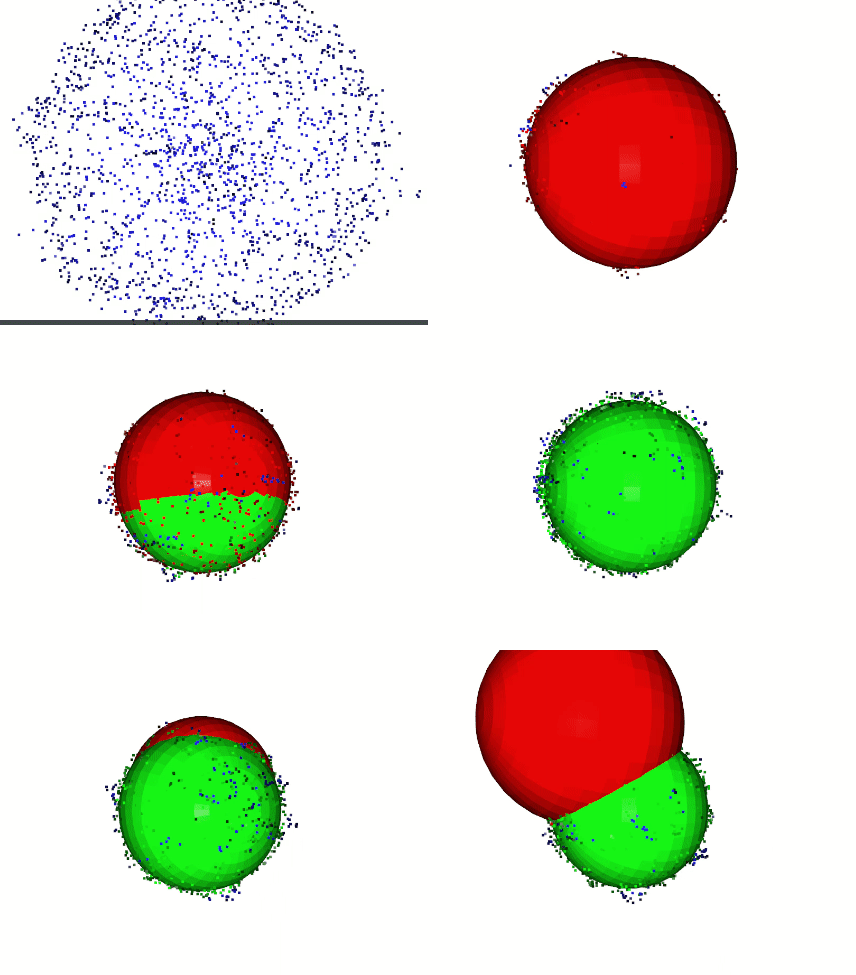
- Fit a Sphere
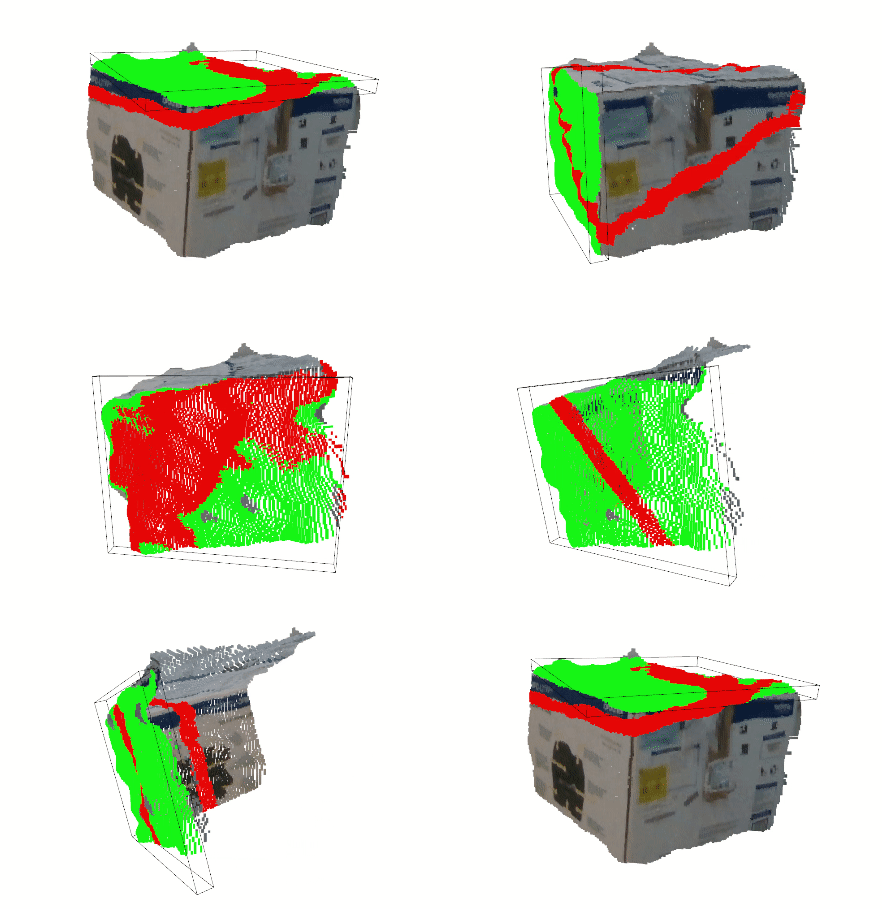
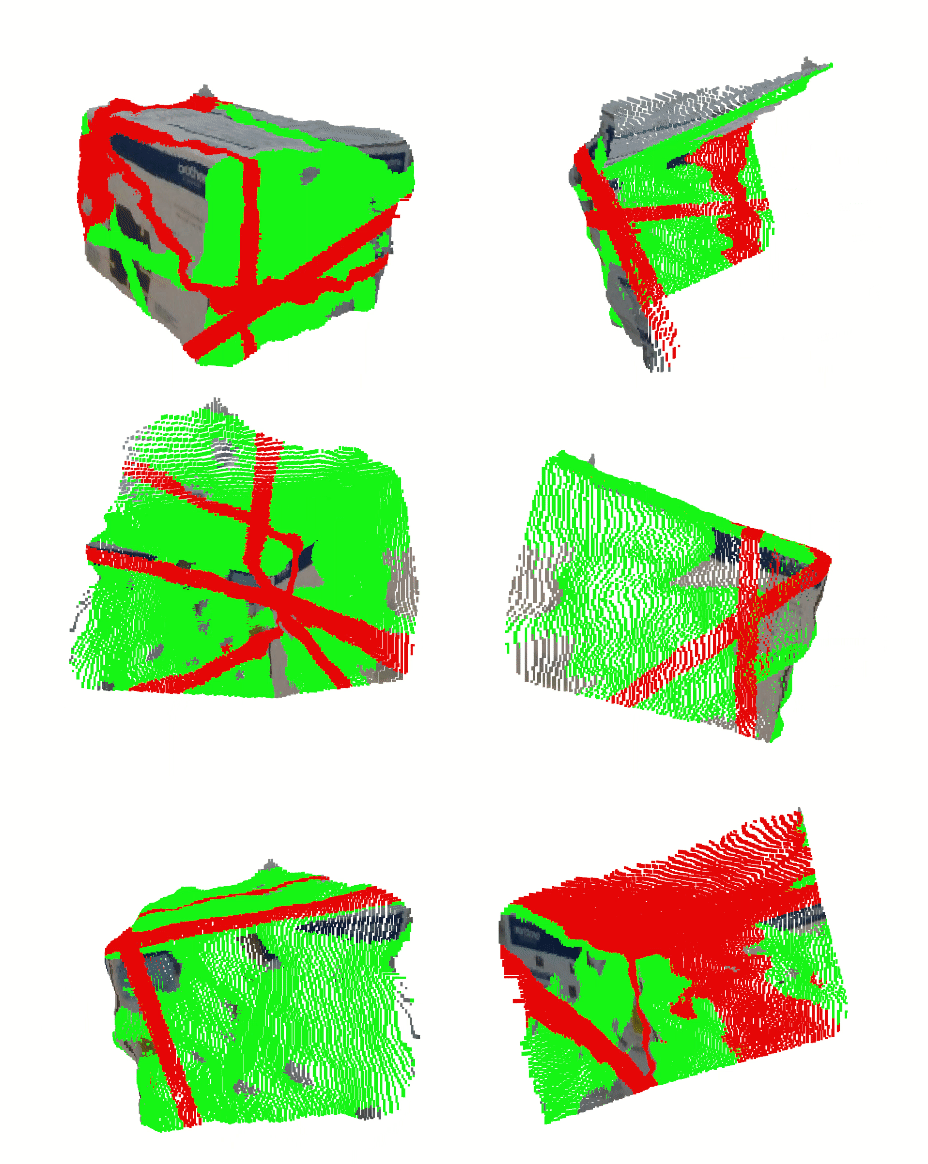
- Fit a Cuboid
- Callbacks
- Visualize With Open3D
- Using Your Own Data
- Where To Go Next
Install
pip install pyransac3d
Choose a Shape
pyRANSAC-3D exposes one fitter class per primitive:
| Shape | Use it when you need | Main result |
|---|---|---|
Point |
A dense cluster around one coordinate | Center and inliers |
Line |
A straight edge, rail, or scan line | Direction, point on the line, and inliers |
Plane |
Floors, walls, tables, roofs, or flat surfaces | Plane equation and inliers |
Circle |
Circular edges in 3D space | Center, axis, radius, and inliers |
Sphere |
Ball-like objects | Center, radius, and inliers |
Cylinder |
Pipes, trunks, poles, or columns | Axis point, axis direction, radius, and inliers |
Cone |
Tapered objects, such as tips, funnels, or piles | Apex, axis, half-angle, and inliers |
Cuboid |
Box-like objects | Center, extents, axes, and inliers |
The exact return values of each fitter are documented in Fit Results, but every one of them returns the indexes of the inlier points. Those indexes are useful for extracting the part of your point cloud that matched the fitted shape.
pyRANSAC-3D expects point clouds as NumPy-compatible arrays with shape (N, 3)
First Fit: Plane
Planes are a good first example because many point clouds contain floors, walls, tables, or other flat surfaces.
import pyransac3d as pyrsc

# Replace this with your own NumPy array with shape (N, 3).
points = pyrsc.ShapeGenerator(seed=0).plane(
    [1, 2, 3],
    [0, 0, 1],
    size=6.0,
    n_points=500,
    noise=0.02,
)

plane = pyrsc.Plane()
equation, inliers = plane.fit(points, thresh=0.05)

print(f"Plane equation (Ax + By + Cz + D): {equation}")
print(f"Inliers: {len(inliers)} of {len(points)}")
The plane result is returned as [A, B, C, D] for:
Ax + By + Cz + D = 0
Fit a Sphere
Use a sphere when you expect points around a ball-like object.
import pyransac3d as pyrsc

points = pyrsc.ShapeGenerator(seed=0).sphere(
    [1, 2, 3],
    radius=3.0,
    n_points=500,
    noise=0.02,
)

sphere = pyrsc.Sphere()
center, radius, inliers = sphere.fit(points, thresh=0.1)

print(f"Center: {center}")
print(f"Radius: {radius}")
print(f"Inliers: {len(inliers)} of {len(points)}")
Fit a Cuboid
Cuboids are useful for boxes, packages, furniture, and other objects with rectangular faces.
import pyransac3d as pyrsc

points = pyrsc.ShapeGenerator(seed=0).cuboid([1, 2, 3], [4, 3, 2], n_points=1000, noise=0.01)

cuboid = pyrsc.Cuboid()
center, extents, axes, inliers = cuboid.fit(points, thresh=0.05)

print(f"Center: {center}")
print(f"Extents: {extents}")
print(f"Axes: {axes}")
print(f"Inliers: {len(inliers)} of {len(points)}")
Callbacks
Every fitter accepts an optional callback. The callback runs during RANSAC and receives a state dictionary for the current iteration, including values such as iteration and best_inliers.
Use a callback when you want to react while fitting is still running: stop early with your own criteria, log intermediate values, inspect candidate parameters, or update a visualization.
Every key of the state dictionary is documented in Fit State.
Early Stop With Your Own Criteria
If the callback returns True, the fit stops early and returns the best result found so far. This is useful when you already know what a good enough result looks like:
import pyransac3d as pyrsc

points = pyrsc.ShapeGenerator(seed=0).plane(
    [1, 2, 3],
    [0, 0, 1],
    size=6.0,
    n_points=500,
    noise=0.02,
)
n_points = len(points)
target_inlier_ratio = 0.8


def stop_when_enough_points_fit(state):
    inlier_ratio = len(state["best_inliers"]) / n_points
    if state["is_best"]:
        print(
            f"iteration {state['iteration']:>4} | "
            f"best inliers: {len(state['best_inliers']):>4} ({inlier_ratio:.1%})"
        )
    return inlier_ratio >= target_inlier_ratio


plane = pyrsc.Plane()
equation, inliers = plane.fit(
    points,
    thresh=0.05,
    maxIteration=1000,
    callback=stop_when_enough_points_fit,
)

print(f"Stopped with {len(inliers)} inliers")
print(f"Plane equation: {equation}")
See the full runnable early stop callback example.
Inspect Progress or Build Visualizations
Callbacks can also be used without stopping the fit. Return False or None to keep RANSAC running, and use the state values to log progress, compare candidate parameters, or update a live plot.
import pyransac3d as pyrsc

points = pyrsc.ShapeGenerator(seed=0).plane(
    [1, 2, 3],
    [0, 0, 1],
    size=6.0,
    n_points=500,
    noise=0.02,
)


def print_progress(state):
    if state["is_best"]:
        print(
            f"iteration {state['iteration']:>4} | "
            f"best inliers: {len(state['best_inliers']):>4} | "
            f"equation: {state['best_model']['equation']}"
        )
    return False


plane = pyrsc.Plane()
equation, inliers = plane.fit(points, thresh=0.05, maxIteration=1000, callback=print_progress)
For a visual version of the same idea, see the plane animation example, where the callback updates the Open3D point colors on every iteration.
Visualize With Open3D
pyRANSAC-3D only needs NumPy to fit shapes, but Open3D is useful when you want to inspect the result visually.
Install Open3D if you are running a visualization example:
pip install open3d
This example fits a plane, paints the inliers red, keeps the remaining points in their original color, and opens an Open3D window:
import numpy as np
import open3d as o3d
import pyransac3d as pyrsc

points = pyrsc.ShapeGenerator(seed=0).plane(
    [1, 2, 3],
    [0, 0, 1],
    size=6.0,
    n_points=500,
    noise=0.02,
)

point_cloud = o3d.geometry.PointCloud()
point_cloud.points = o3d.utility.Vector3dVector(points)

plane = pyrsc.Plane()
equation, inliers = plane.fit(points, thresh=0.05)

inlier_cloud = point_cloud.select_by_index(inliers)
inlier_cloud.paint_uniform_color([1.0, 0.0, 0.0])

outlier_cloud = point_cloud.select_by_index(inliers, invert=True)
outlier_cloud.paint_uniform_color([0.6, 0.6, 0.6])

o3d.visualization.draw_geometries([outlier_cloud, inlier_cloud])
The repository has richer Open3D examples that also draw fitted meshes, wireframes, bounding boxes, and live RANSAC animations.
Using Your Own Data
If your points are already in memory, pass them directly:
import numpy as np
import pyransac3d as pyrsc

points = np.asarray(my_points)

plane = pyrsc.Plane()
equation, inliers = plane.fit(points, thresh=0.05)
For best results:
- Make sure the array has shape
(N, 3). - Choose
threshbased on your point cloud units and expected noise. - Inspect
len(inliers)to see how much of the cloud matched the fitted shape. - Try a few thresholds if the fit is too strict or too permissive.
Where To Go Next
- Browse the examples folder for runnable scripts for every shape.
- Start with the simple examples: Point, Line, Plane, Circle, Sphere, Cylinder, Cone, and Cuboid.
- Try the Open3D visual examples: Point, Line, Plane, Circle, Sphere, Cylinder, Cone, and Cuboid.
- Use the animation examples to see callbacks in action: Point animation, Line animation, Plane animation, Circle animation, Sphere animation, Cylinder animation, Cone animation, and Cuboid animation.
- Open the API pages for each fitter: Plane, Sphere, Cylinder, Cone, Cuboid, Line, Circle, and Point.
- Use Shape Generator to create synthetic point clouds while learning or testing.